 GPC Base
RIFT V3 · SOURCE-CHECKED REFERENCE
Rift V3 Value Finder, humanized timing and saved settings
Rift is the #1 NBA 2K27 Cronus Zen script recommendation here. This reference explains the actual V3 timing changes, feedback controls and saved profiles, checked against the supplied source on October 27, 2026.
What humanized timing means in V3
V3 requests small variations around the saved shooting value. A 500 ms base can request 499, 500 or 501 ms when variation is active, without rewriting the saved base. Requests stay within the allowed range. Eligible quick-stop and dribble routines also receive controlled variation. These are requested inputs: the device and game can affect actual output timing. This is not proof of a larger green window, detection immunity or a guaranteed physical 1 ms difference.
Why Finder tracks both base and duration
The V3 Finder records the selected base and the duration requested on each attempt. It uses balanced offsets while testing a base, rather than testing only fixed inputs and then playing with a different timing routine. You still report the shot result. Finder does not inspect pixels, read the game feedback automatically or detect a green window.
The current menu and Season 2 status
The current source has 14 menu pages. Infinite Stamina is removed; its old saved-data position is reserved, not an active mod. EmberZens confirmed Season 2 compatibility on October 27, 2026. That compatibility confirmation is separate from our source check of the menu and timing routines. Earlier official clips below are not newly recorded V3 tests.
A script built around your player
Rift’s script generator lets you customize settings to match your player build instead of using one preset for everyone. It is included in EmberZens Hub after purchase. Pair that personalized starting point with Value Finder’s guided shot tests, then save the settings that work in one of three Rift profiles. Your generator setup, saved timing and shooting mode belong together; a different jumper or game update can still call for retesting.
Auto-Green and Button Tempo are different settings
Button and Rhythm Auto-Green have separate saved timing values. In the supplied V3 file, the Auto-Green test range is 400–800 ms. Button Tempo uses its own 20–70 ms range. These are limits in this file, not recommended settings for every build.
What each feedback label means
For an Auto-Green timing test, use the EARLY / EXCELLENT / LATE options to report your shot feedback. Tempo tests instead use FAST / EXCELLENT / SLOW. The script uses your input to adjust the next candidate; it does not read your MyPLAYER or the game's feedback automatically.
New test, pause and resume
Finder tracks the active test setup. Resume is conditional on the saved setup, profile, and controller matching. If those conditions changed, start a new test rather than treating old test feedback as a result for the new setup.
SAVE MS, TEST AGAIN and PAUSE
SAVE MS applies the selected test value. TEST AGAIN reruns the test. PAUSE leaves you a choice to continue later when the setup still matches. Read any RESULTS MIXED, NO CLEAR RANGE, or TEST LIMIT REACHED message before deciding to save.
Three profiles, separate shooting values
Three profile slots remain available. Keep your reliable MyPLAYER setup in one slot and use another for a different jumper. Separate Button/Rhythm values let you keep each shooting style's timing without overwriting the other.
Which reference should you follow?
This page is checked against Rift V3.gpc. Older guides on this site explicitly reference V1.1 and may show a different menu or range. Follow the version currently available in your EmberZens Hub and its matching instructions.
YOUR SCRIPTS. ONE HOME.
Checkout to your Hub.
Hub to your Zen.
- Buy Rift once.Use an email you can access at checkout.
- Open EmberZens Hub.Sign in with that same email and open My Scripts.
- Connect and install.On the supported desktop setup, connect your Zen, drag Rift into a slot, and choose Install on Zen.
Compatible Cronus Zen hardware and NBA 2K27 are required and sold separately. Follow the Hub's current browser, controller and platform instructions.

RIFT · NBA 2K27 · GAMEPLAY & DEMOS
See why we pick Rift.
Real gameplay. Useful features. Choose what you want to see.
Official footage and customer figures from EmberZens. Earlier Rift demonstrations; not newly recorded V3 tests. Feature demos are separate from online gameplay. Settings and results vary.
RIFT V3 · A BIGGER REASON TO CHOOSE THE #1
Your jumper.
Your settings.
Meet Value Finder.
Find the right settings for your build and jumper—without guessing every value yourself. Run the guided test, enter your shot feedback, and let Rift adjust the next value to try.
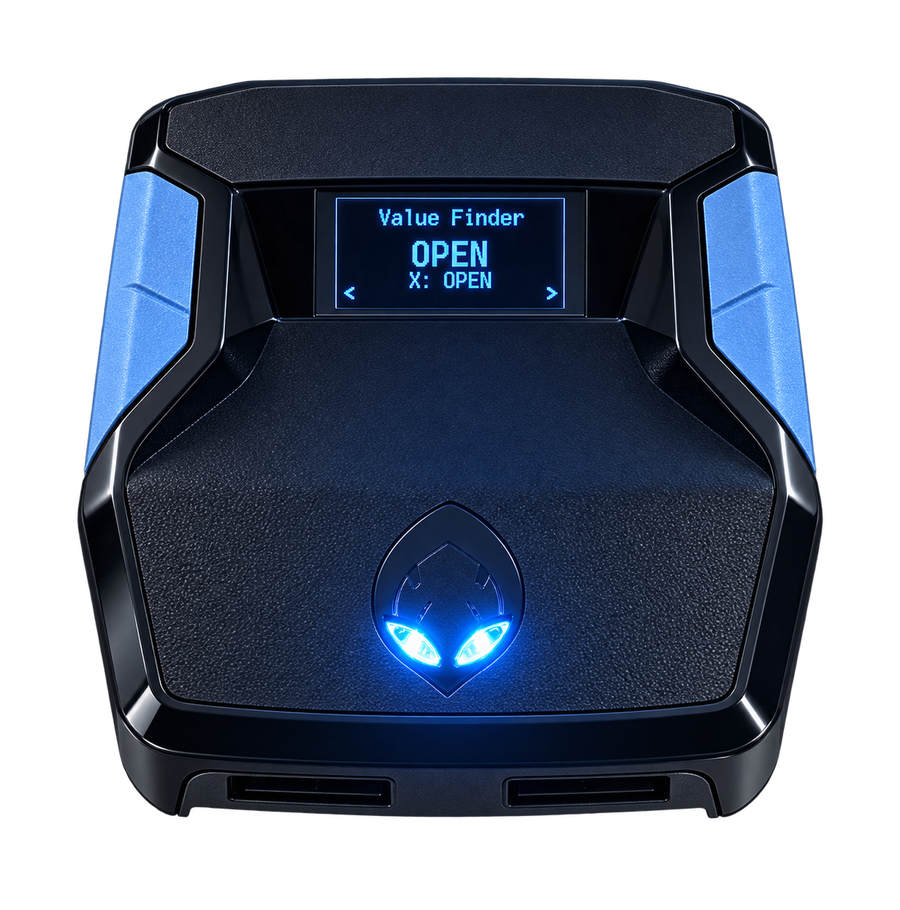
Test. Adjust. Save.Included with Rift V3
RECENT EMBERZENS COMMUNITY FEEDBACK
Real players. In their own words.
“Rift is the best script”
“yeah no joke ive tried all of them”
In the same conversation, Sonder recommends finding your own values in MyCOURT and says he also uses Button Tempo.
“the new update just made it better without messin wit it”
“Script fire with button just gotta figure out my auto green but this is better than Yew”
Shared with permission. These are individual experiences, not guaranteed results or an independent comparison test. Discord source links may require sign-in. Customer totals are supplied by EmberZens.